Crystal Maze 3D
Free online maze game · Keyboard, mouse and touch
 Crystal Maze 3D
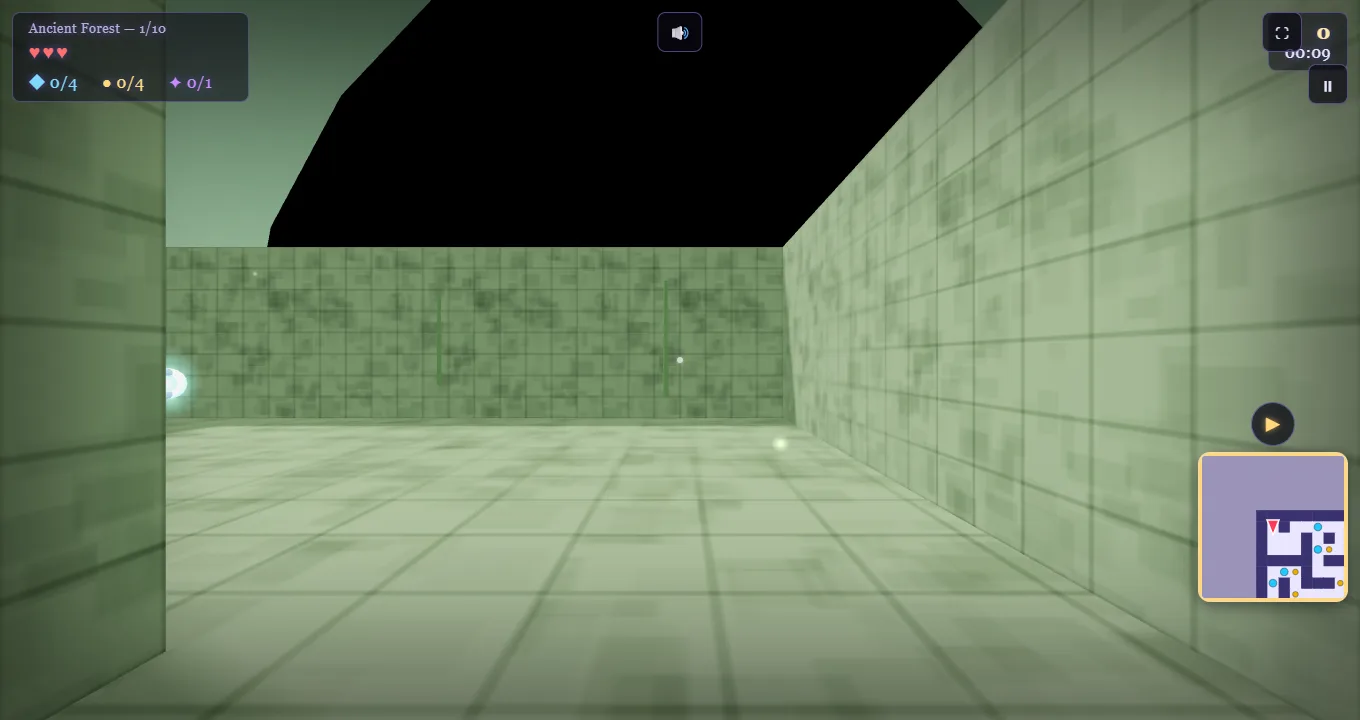
 is a free single-player, first-person 3D maze game by Samah Mohamed (Samah Games). Play in your browser through the Y8 player: explore 10 randomly generated mazes, collect crystals and escape through portals.
Crystal Maze 3D walkthrough: all 10 levels, crystals and golden key
MoveW A S D or arrow keys
LookMouse · Click / Space to attack
TouchJoystick + on-screen buttons
All controlsHow to play
1. Collect every crystal
Explore the branches in Crystal Maze 3D and use the minimap to keep track of passages. Watch the crystal counter as you collect. Coins and gems also appear, but they do not replace this required objective.
2. Find the golden key
Complete the crystal counter first. In ordinary levels, the golden key becomes visible after that. Check reachable branches and dead ends, including passages you visited earlier. The generated layout changes between runs.
3. Enter the open portal
Collect the key to open the portal, then return to the exit. Look before crossing a passage with traps or enemies. The last level includes a boss and opens the exit directly when you collect all crystals.
For keyboard and touch details, visit the Crystal Maze 3D controls page.
What is Crystal Maze 3D?
Crystal Maze 3D is a first-person HTML5 maze game by Samah Mohamed, also known as Samah Games. You see the corridors from inside the maze rather than guiding a dot across a flat map. Turning your view, reading junctions and keeping track of explored branches are part of the puzzle. The minimap helps you connect the passage in front of you with the route you have already travelled.
There are five scenes, with two consecutive levels in each: Ancient Forest, Crystal Cave, Frozen Ruins, Dark Temple and Magic Castle. The opening grid is 9 × 9; the finale is 19 × 19. Corridors and pickups are generated for each run, so copying a fixed series of left and right turns will not reliably work. Learn the objectives and use the live minimap instead. Play Crystal Maze 3D directly in your browser using the embedded Y8 player above.
Your required objective is the crystal counter. Coins, coloured gems and treasure chests add score, but do not replace a missing crystal. In ordinary levels, all crystals reveal the golden key and that key opens the portal. Level 10 changes this sequence: collecting the crystals opens the exit directly and weakens the boss. You do not need an ordinary key there.
Game features
- Game type
- Single-player, first-person 3D maze puzzle
- Play online
- Free HTML5 browser game; no installer or plugin
- Levels
- 10 mazes across five scenes, from 9 × 9 to 19 × 19
- Maze generation
- Random corridors and pickup positions on each generated level
- Controls
- Keyboard and mouse; touch joystick and action buttons
- Replay goals
- Level timers, up to three stars and achievements
Explore at your own pace to learn the passages, then replay for a faster finish. Enemies, traps and optional power-ups add an action element to the maze puzzle. For the level objectives, use the walkthrough; for keyboard focus and touch input, open the controls guide.
How the 10 levels get harder
Crystal Maze 3D builds difficulty by expanding the grid, spreading the objectives and adding hazards. These are the level settings; check the HUD for the actual pickup total in your generated maze.
- Level 1. The 9 × 9 Ancient Forest starts with a target of four crystals and no enemies or traps, giving you space to practise following a branch back to its junction.
- Level 2. The 11 × 11 forest adds a fifth crystal, one ghost and one spike trap, so your first return trip now needs attention as well as navigation.
- Level 3. The 12 × 12 Crystal Cave raises the target to six crystals and adds a second trap while keeping one ghost, making unchecked side passages easier to miss.
- Level 4. The 13 × 13 cave keeps six crystals but introduces a spider beside the ghost, so two enemies can interrupt the same collection route.
- Level 5. The 14 × 14 Frozen Ruins needs seven crystals and pairs a spider with a guardian; a third trap introduces a barrier that opens and closes.
- Level 6. The 15 × 15 frozen maze needs eight crystals and adds a second spider, putting three enemies across a larger set of branches.
- Level 7. The 16 × 16 Dark Temple keeps eight crystals but changes the enemy mix to guardians and spirits and raises the trap target to four.
- Level 8. The 17 × 17 temple increases the target to nine crystals, four enemies and five traps, leaving more hazards to account for on the way to the exit.
- Level 9. The 18 × 18 Magic Castle requires ten crystals among four enemies and five traps, making a systematic sweep more useful than repeated trips through the central junctions.
- Level 10. The 19 × 19 castle finale keeps ten crystals and five traps but replaces ordinary enemies with a boss, with no golden-key stage before the open portal.
Clear a branch before moving on to the next one. When a later maze feels confusing, pause at a junction and compare the minimap with the corridors you can see. A longer grid does not require a faster sprint; it requires fewer forgotten branches. The Crystal Maze 3D walkthrough covers the objectives for all ten levels.
Keyboard, mouse and touchscreen controls
On a computer
Use WASD or the arrow keys to move, and use the mouse to look. Movement follows the direction you are facing. Press Play game on this page, choose Play inside the loaded player, then click the game view to give it keyboard focus and enable mouse look. If an arrow key scrolls the website, click inside the player again. Fullscreen gives the maze more room without changing the controls.
Left click or Space attacks an enemy in front of you; hold Shift to sprint. Esc pauses the game and can release the captured mouse. After checking a guide or leaving the player, click the game view before moving again. Try short turns at intersections rather than holding forward while searching for the next corridor. See all Crystal Maze 3D controls for focus and fullscreen help.
On a phone or tablet
Crystal Maze 3D supports touch controls. Move with the on-screen joystick and drag outside the joystick and menu buttons to turn your view. Use the action buttons to attack, sprint or pause. Landscape orientation provides more room for your thumbs and the minimap; the Fullscreen button below the player can expand the game area.
Test walking and turning separately before combining them. At an unfamiliar junction, stop the joystick, look down each passage and then choose your direction. This helps avoid walking into a trap while your other thumb is rotating the camera. The device needs a compatible WebGL browser and an internet connection to load Y8. If the player cannot load, the link beneath it opens the game directly on Y8.
Crystals, keys and useful pickups
The crystals in Crystal Maze 3D are placed in reachable passages, often at dead ends, with other open cells used when needed. Look all the way down a side branch before returning to the junction. When the counter is complete, the golden key becomes visible and its yellow minimap marker helps you find it. The key can be in a passage you already checked while it was still hidden.
The portal is placed farthest from the start by distance along the maze path. A wall can separate two nearby-looking map squares, so follow connected corridors rather than aiming straight toward the marker. Note the portal route while collecting and retrace that route after picking up the key. If it remains closed, check whether you have actually collected the key rather than just revealed it.
Optional gems and power-ups use randomly selected reachable open cells. They are not tied to a fixed corner or a secret doorway. Shield prevents damage while active, Freeze pauses enemies, and Speed Boost helps movement; Magnet, Double Score and Invisibility offer other ways to improve a run. Take useful pickups on your current route, but avoid crossing a dangerous passage solely for an optional gem when your health is low. For more detail, read the Crystal Maze 3D power-up guide.
Opening a treasure chest also creates a checkpoint. Losing all health costs a life; if lives remain, you respawn at the checkpoint. Watch the heart display before returning through a trapped corridor. Each level can award up to three stars, and achievements reward progress, but reaching the open portal is the immediate goal. First finish the maze; then try a cleaner route on another run.
Choose a level
Frequently asked questions
Is Crystal Maze 3D free to play?
Yes. Crystal Maze 3D is free to play in your browser. Use the Play game button to load the Y8 player; no payment or site account is required.
Do I need to download anything?
No. The HTML5 game runs in a compatible browser with WebGL support. You need an internet connection to load the player, but no installer or browser plugin.
What is Crystal Maze 3D V2?
Crystal Maze 3D V2 is the current browser version with 10 levels, six named power-ups, achievements and up to three stars per level. It is the same game loaded by the player on this page.
How many levels are there?
Crystal Maze 3D V2 includes 10 levels across forest, cave, frozen lands, temple and castle scenes. The final level includes a boss encounter.
Where do I find the golden key?
In ordinary levels, finish collecting the crystals before looking for the golden key. The key then opens the portal. The layout is generated for each run, so a fixed sequence of turns is not a reliable guide.
What are the crystal and portal mechanics?
Crystals are the main collection objective. In ordinary levels, collecting them reveals the key; picking up that key opens the portal. Reach the open portal to complete the level. The final boss level uses a different exit sequence.
Can I play it on my phone?
Yes. The game supports a touch joystick and action buttons. Landscape orientation and the Fullscreen button make the play area easier to use on a small screen.
Where can I play this browser maze game?
Use Play game on this page to load the Y8 player, then choose Play in its menu. This website provides the embedded player and linked walkthroughs for Crystal Maze 3D; the game itself is by Samah Games.
Are the mazes randomly generated?
Yes. Corridors and pickup positions are generated when a level is built. The level settings stay fixed, including grid size and crystal targets; the route changes between runs. Use the minimap rather than a fixed list of turns.
Does the game have a timer?
Yes. Each level tracks elapsed time and awards up to three stars using that level’s time thresholds. The timer is part of the game; it is separate from the lives and health indicators.
How does difficulty increase?
The ten levels expand from a 9 × 9 grid to a 19 × 19 grid. Later levels introduce more enemies, traps and crystals, with a boss in the finale. The game progresses through these level settings; there is no separate difficulty selector in the current build.
Is this the same as the TV show The Crystal Maze?
No. Crystal Maze 3D here means the first-person browser game by Samah Games. This website is an independent game and guide site, separate from the television show The Crystal Maze.
Game by Samah Mohamed / Samah Games, available on Y8. Level settings and generation rules: the current game build.